Tarot card templates and sizes for common printers
Every card printer publishes its own tarot card template, and you should always download the one for the printer you are actually using. The standard tarot trim is 2.75 x 4.75 inches, which is 825 x 1425 pixels at 300 DPI, plus about 0.125 inches of bleed on every side. The template is where those numbers become an exact file.
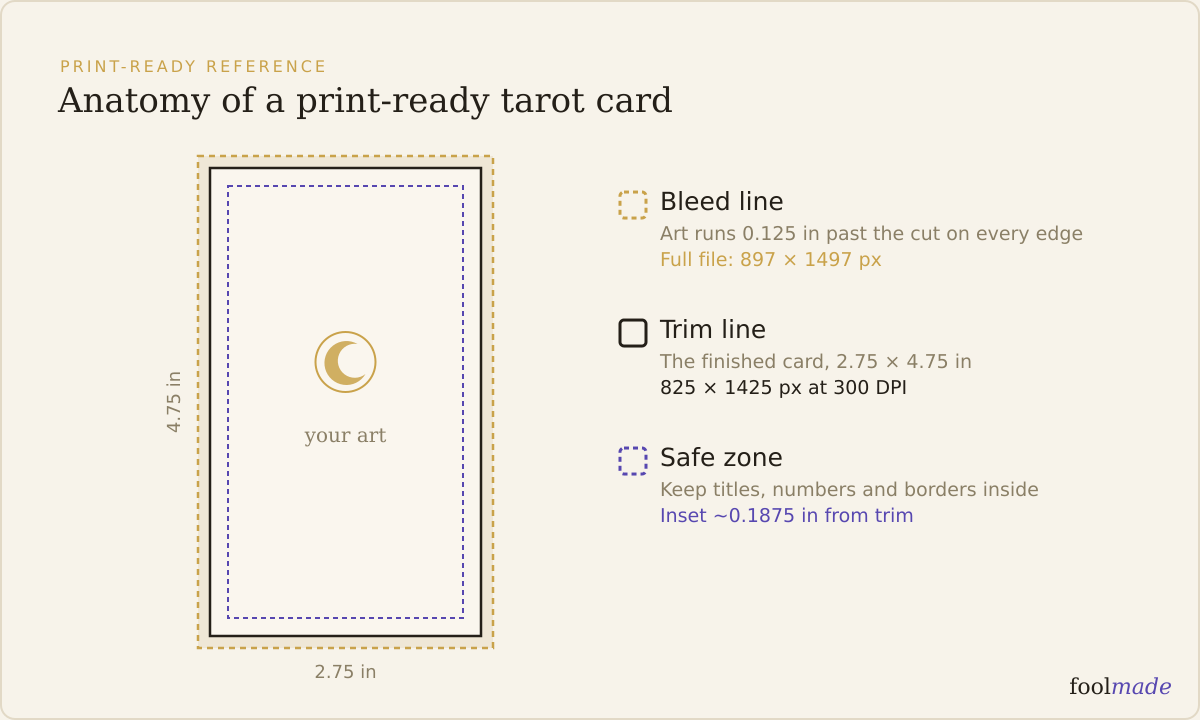
A template is the printer telling you, in their own measurements, where the blade cuts, how far your art has to run past that cut, and how far in to keep anything you cannot afford to lose. Two printers can both call a card "tarot size" and still hand you slightly different bleed numbers. That is why you match the file to the printer, not to a blog.
What is a tarot card template?
It is a layered file, usually PDF, PSD, AI, or an app-specific format, with three guides drawn on it: the trim line, the bleed line, and the safe zone. You paint inside those guides and export. The printer then knows exactly where everything lands.
The trim line is where the card gets cut, at 2.75 x 4.75 inches for standard tarot. The bleed line sits outside it, and your background has to reach all the way there. The safe zone sits inside, and titles, numbers, and borders stay within it.
At 300 DPI the pixel math is just inches times 300. The 2.75 inch width becomes 825 pixels, the 4.75 inch height becomes 1425 pixels, and a 0.125 inch bleed adds roughly 37 pixels per side. A template hands you those exact frames so you are not eyeballing them. For every unit, see tarot card size and dimensions.
Where do you download a tarot card template?
Every major card printer keeps templates on its own site, near the product page or in a help section. Download the one for your exact card size and, where offered, your card count, because some printers tune the bleed slightly per product.
| Printer | Standard tarot trim | File with bleed | Where to get the template |
|---|---|---|---|
| MakePlayingCards (MPC) | 2.75 x 4.75 in | ~2.99 x 4.99 in (0.12 in/side) | Template guide page, plus the online maker's built-in guides |
| DriveThruCards | 2.75 x 4.75 in | 3.00 x 5.00 in (0.125 in/side) | Card templates link on the publisher page (InDesign, Affinity, Scribus, more) |
| The Game Crafter | 2.75 x 4.75 in | printer-specific, guides on the file | Tarot Deck product page and Templates help article |
| Shuffled Ink | 2.75 x 4.75 in | add 0.125 in/side | Templates and setup guides on the tarot cards page |
Those trim numbers agree. The bleed numbers do not always. DriveThruCards asks for a full 3.00 x 5.00 inch layout, MPC lands near 2.99 x 4.99, and The Game Crafter marks the bleed on the file itself rather than quoting one number. Confirm the figures on the template you download, as of 2026, because printers do revise them.
Why do templates differ between printers?
Every printer runs its own presses, cutters, and tolerances, so each one decides how much bleed it needs to cut cleanly. One asks for 0.125 inches per side, another for a hair less, another marks it visually instead of naming a number. The trim size stays the same. The edges around it move.
Corner radius is the other quiet difference. Most tarot cards round to about 0.125 inches, but the exact curve is set by the printer's die, and the template shows where it falls so your art is not clipped at the corners.
This is the whole reason to download rather than reuse. A file built to DriveThruCards' 3.00 x 5.00 layout is not automatically right for another printer's numbers. Build to the template of the printer you are sending to, and if you switch printers, pull the new one and check your file against it first.
How do you use trim, bleed, and safe zone on a template?
Open the template and you will see three nested rectangles. Work from the outside in and you cannot get it wrong.
- Bleed (outer line): extend your background all the way to it. This art gets cut off on purpose. It exists so a slightly off cut still lands inside your color instead of exposing white paper.
- Trim (middle line): where the blade aims. Do not treat it as a hard edge for your design, because the real cut wanders a little around it across 78 cards.
- Safe zone (inner line): keep every title, card number, border, and key symbol inside it. Anything between the safe zone and the trim might get shaved.
Borders are the classic trap. A thin frame hugging the trim line comes back visibly thicker on one side across a run, because the cut is never perfectly centered. Pull borders into the safe zone or drop them. For why that outer margin exists, read what bleed is and how much your deck needs.
Do you need a different template for card backs?
Yes, treat the back as its own file built on the same template. It shares the trim, bleed, and safe zone of the fronts, so it goes on the identical frame, but printers usually want the back uploaded separately.
Backs live or die on the safe zone. A centered symbol that drifts, or a border that hugs the trim, shows every off cut far more obviously on a repeated back than on varied card faces. If the back is meant to read the same upright or reversed, confirm it is truly symmetrical on the template guides before you export all 78.
What if my art is already made at the wrong size?
Match it to the template now, before you pay for anything. A card built at 800 x 1400 pixels instead of 825 x 1425 still opens and still looks like a tarot card on screen, so this mistake is silent until the proof arrives short on bleed or soft on detail.
Set a fresh canvas to the template's full-bleed dimensions at 300 DPI, place your art, and reposition it so the design sits inside the safe zone with background running to the bleed. Do not upscale a small file to fake the resolution, because the printer still sees the missing pixels. A card painted too small to fill the frame at 300 DPI may need reworking rather than resizing. Run the whole set through the print-ready checklist before you send it.
Frequently asked questions
What size is a standard tarot card template?
The standard tarot template trims to 2.75 x 4.75 inches, or 825 x 1425 pixels at 300 DPI. With about 0.125 inches of bleed per side, the full file runs near 3.00 x 5.00 inches, depending on the printer's exact bleed spec.
Are printer templates free?
Yes. MPC, DriveThruCards, The Game Crafter, and Shuffled Ink all give their templates away as free downloads, because they want files that print correctly. You download it, design inside the guides, and upload the finished cards.
Can I use one template for every printer?
No. The trim size matches across printers, but bleed amounts and corner dies differ, so a file built for one printer's template can be slightly off for another's. Download the template for the printer you are actually sending the deck to.
What file format are printer templates in?
Most printers offer several: PDF, PSD, and AI are common, and DriveThruCards adds InDesign, Affinity Publisher, and Scribus versions. Pick the format for the app you paint in, then export to whatever the printer asks for at upload, usually a print PDF with bleed.
Do I need bleed if the printer gives me a template?
Yes. The template shows the bleed line precisely so you can fill it, but you still have to extend your background to it yourself. A template with an empty bleed area prints the same white edges as no template at all.
Download the template for your printer, build every card on it, and hold all 78 to that one frame. If you want a fast second opinion first, Foolmade's print check reads a card you have already made and tells you whether its size and bleed match the standard, or the printer template you are targeting. We never print your deck and never touch your art. We just confirm the numbers line up.
- The Kurtzahn Tarotblank space left for the reader