RGB vs CMYK for tarot cards: what happens
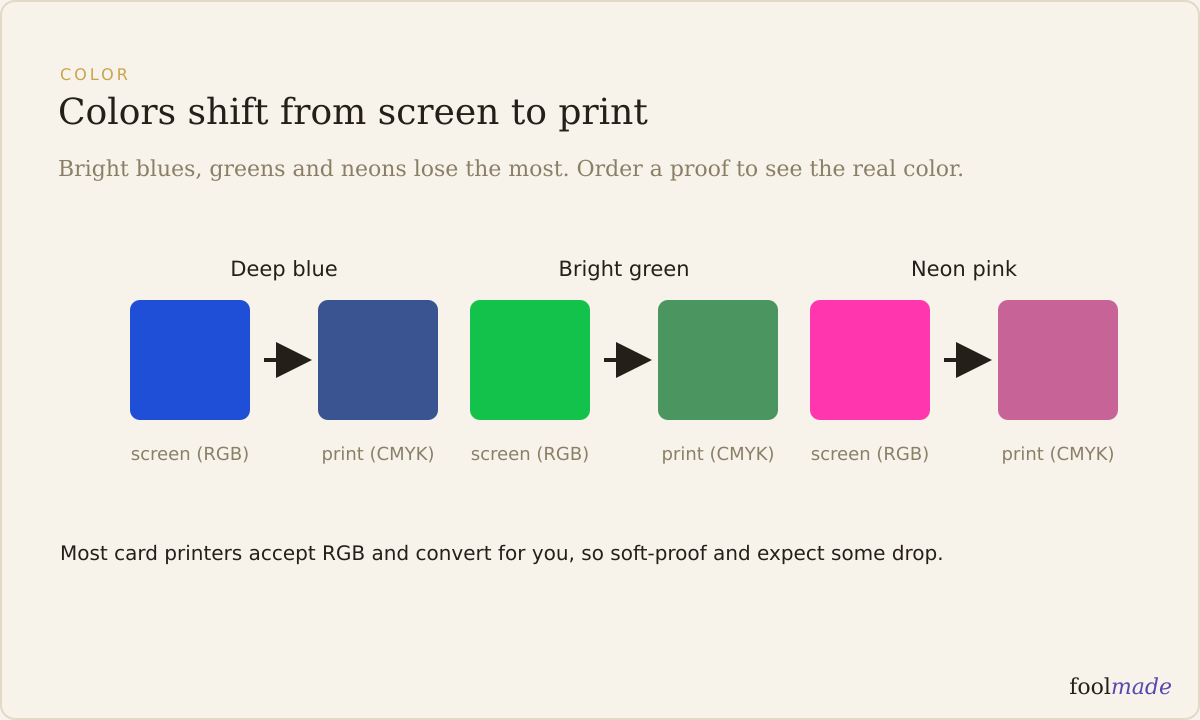
RGB is screen light, CMYK is print ink. RGB mixes red, green, and blue light and can show colors that ink cannot reach. When a file converts to CMYK for printing, out-of-range colors shift to the nearest ink match, so deep blues, bright greens, and neons dull. Most card printers accept RGB and convert it for you.
That trips up a lot of first-time deck makers. You do not usually hand a printer CMYK files. You hand them RGB, and their press software does the conversion. The real question is not "should I convert" but "what will the conversion do to my art, and can I see it before I pay?"
What is the difference between RGB and CMYK?
RGB is additive. It starts from black and adds red, green, and blue light to build color, the way your monitor, phone, and Procreate canvas do. Stack all three at full and you get white.
CMYK is subtractive. It starts from white paper and lays down cyan, magenta, yellow, and black ink, each one absorbing part of the light bouncing off the page. Stack them and you approach a muddy near-black, which is why printers add a real black channel (the K).
The practical gap is the gamut, the total range of colors each mode can produce. RGB's gamut is larger. Some colors that glow on your screen have no ink equivalent, so print simply cannot match them.
| RGB | CMYK | |
|---|---|---|
| What it is | Red, green, blue light | Cyan, magenta, yellow, black ink |
| How it makes color | Adds light (additive) | Subtracts with ink (subtractive) |
| Gamut | Wider, includes bright/neon | Narrower, no glowing colors |
| Where it's used | Screens, Procreate, web, phones | Printing presses, physical cards |
| Who converts | You design here | Printer converts your file to this |
Why do my colors change when I print?
Because your screen shows you colors the ink cannot make. The conversion has to map every screen color to the closest printable one, and colors near the edge of the RGB gamut have the farthest to travel.
Three families shift the most on tarot and oracle cards:
- Deep saturated blues go slightly purple or lose their depth. A midnight-sky background is the classic casualty.
- Bright greens dull toward a flatter, grayer green. Neon and electric greens have almost no CMYK equivalent.
- Neons and hot pinks cannot be printed at their screen intensity at all and drop to a softer version.
Oranges and warm skin tones usually hold up well. Blacks can look less deep if the file uses a single ink channel instead of a rich black mix, which is a printer setting, not something you normally control.
None of this means your deck will look bad. It means the version on the card is a print translation of the version on your screen, and the wilder your palette, the bigger the translation.
Do printers want RGB or CMYK files?
Most card printers, including the common tarot and oracle printers, ask for RGB and convert it themselves using a color profile tuned to their exact press and stock. Their conversion is usually better than a blind one you do in your art app, because it is calibrated to their machine.
A few printers, mostly traditional offset shops doing large runs, ask for CMYK files with a specific profile. Always read your printer's file spec before exporting, and if it does not say, ask. Sending CMYK to a printer that expected RGB, or the wrong CMYK profile, can shift color a second time.
If you design in Procreate, note that Procreate works in RGB and its CMYK export is limited. See exporting your cards from Procreate for print for the export settings that actually match what printers want.
How do I preview the shift before I print? (soft-proofing)
Soft-proofing is asking your software to simulate CMYK on your RGB screen, so you see the dulling before you commit. In Photoshop it's View, then Proof Setup, then a CMYK profile, then toggle Proof Colors. Affinity and other tools have the same feature under a different name.
Load your printer's profile if they publish one. Soft-proofing shows you which cards lose the most, so you can nudge those colors up before conversion instead of being surprised on paper.
Soft-proofing on a screen is still a simulation, not the real thing. The only way to truly see the color your press produces is a physical proof: a single printed sample on your actual stock. A proof costs a few dollars to around twenty and can save a full run. See whether you need a proof before your print run for how and when to order one.
Should I design in RGB or CMYK?
Design in RGB. It's the wider space, it's what your tools default to, and it's what most card printers want to receive. Converting to CMYK too early throws away color range you can't get back, and can make your working file look duller than it needs to during the months you're painting.
Keep your master files in RGB at 300 DPI. Soft-proof late, once the art is done, to spot problem cards. Convert to CMYK only if your specific printer's spec demands it, using the exact profile they name. That order keeps the most color on the card.
For a full run of everything a file needs to be press-ready, size, bleed, resolution, and color, see the print-ready tarot deck checklist.
Frequently asked questions
Do I need to convert my tarot cards to CMYK myself?
Usually no. Most card printers accept RGB and convert it with a profile tuned to their press. Only convert to CMYK yourself if your printer's file spec explicitly asks for it and names a profile.
Why do the blues and greens in my deck look duller when printed?
Deep blues and bright greens sit near the edge of what ink can reproduce, so the RGB-to-CMYK conversion shifts them to the nearest printable color. That shift reads as dulling. Soft-proof and order a physical proof to see it in advance.
Does Procreate export CMYK for tarot cards?
Procreate works in RGB and its CMYK export is basic. For most card printers that's fine because they want RGB anyway. Export a high-resolution RGB file at 300 DPI unless your printer specifically requires CMYK.
Will my printed deck exactly match my screen?
No print exactly matches a backlit screen, and it isn't meant to. A calibrated monitor, soft-proofing, and a physical proof get you close enough that the difference is minor and predictable.
What DPI and color should my files be?
300 DPI, RGB, unless your printer's spec says otherwise. Resolution and color are separate settings, and both need to be right before you send files.
The bottom line: design in RGB, soft-proof late, and order one physical proof before a full run. If you want a second pair of eyes on resolution, bleed, size, and color mode before you spend money, Foolmade's print check flags the file issues that cause reprints, so your art reaches the press the way you painted it. Foolmade never touches or generates your art.