Keeping all 78 cards the same size and aligned
A consistent tarot card size means all 78 cards share the exact same trim, bleed, DPI, and orientation. If even one card is built on a different canvas, the deck feels wrong in the hand, and your printer will either reject the batch or trim it unevenly across the run.
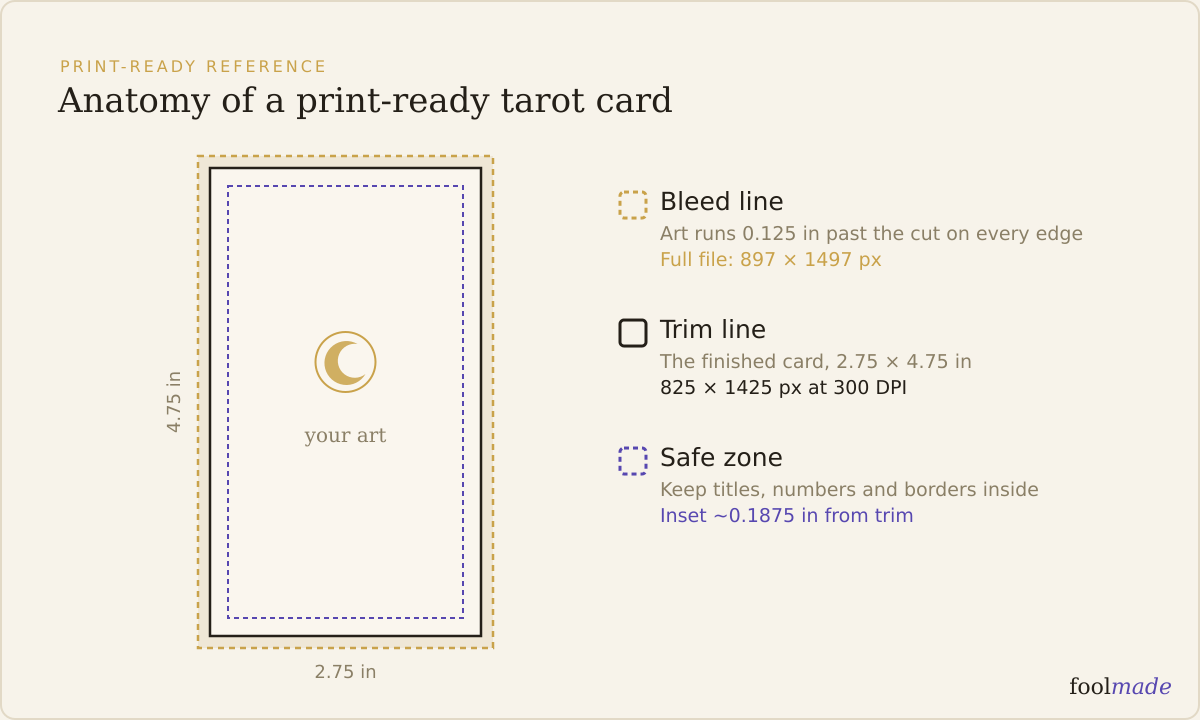
This is the quietest way a home-made deck goes wrong. Each card looks fine on its own. The mismatch only shows up when 78 files sit side by side, or when the printer flags a card that is 40 pixels short.
Why do the cards end up different sizes?
A deck is not made in one sitting. It is painted card by card over weeks or months, often across different files and sometimes different apps. That is exactly how the sizes drift apart.
The usual causes are boring and specific:
- One card was exported at 150 DPI while the rest are 300, so it comes in at half the pixel dimensions.
- A Major Arcana card was started on a fresh canvas at a slightly different size than the template.
- The card back was built at poker dimensions (2.5 x 3.5 in) while the fronts are tarot (2.75 x 4.75 in).
- A card got scaled to "fit" a frame, or one landscape card slipped into a portrait deck.
None of these are dramatic. That is the problem. A card that is 800 x 1400 pixels instead of 825 x 1425 still opens and still looks like a tarot card on screen. You find out it was wrong when the proof arrives with an off border or a white sliver on one edge.
What does "the same size" actually mean?
Four things have to match on every single card, front and back. Trim is only the first of them.
| Layer | What it is | Must match across all 78? |
|---|---|---|
| Trim size | The finished card after cutting, e.g. 2.75 x 4.75 in | Yes, exactly |
| Bleed | Art extended past trim, ~0.125 in per side | Yes, same on every card |
| DPI | Resolution, 300 minimum for card printing | Yes, identical |
| Orientation | Portrait vs landscape | Yes, one orientation |
For a full-bleed standard tarot card that means a 897 x 1497 pixel canvas at 300 DPI: an 825 x 1425 trimmed face plus about 37 pixels of bleed on each side. Every card, every back, same numbers. If your printer's template lists different figures, match the template, not this, but match one set of numbers for the whole deck.
Two cards can both be "2.75 by 4.75" and still not match if one has bleed and the other does not. The size is the whole spec, not just the inch measurement.
How do you keep every card the same size?
Set the canvas once and never resize a card again. That single habit prevents almost every mismatch on this page.
1. Download your printer's template first. Do not guess the dimensions. The template has the exact trim, bleed, and safe zone your printer cuts to. See tarot card templates and sizes for common printers.
2. Build one master canvas from it. For full-bleed standard tarot that is 897 x 1497 px at 300 DPI. Save it as your blank card file.
3. Start every card by duplicating that blank. New card, new duplicate. Never open a fresh canvas and type in dimensions from memory.
4. Paint inside the frame, do not scale to it. Composing on the fixed canvas keeps the aspect ratio intact. Shrinking or stretching art to "make it fit" is what warps a card.
5. Build the card back the same way. The back is card 79 in disguise and it drifts to poker size more than any other card. Same canvas, same bleed.
6. If you change the trim, change it for all 78. Redo the master template and rebuild, rather than resizing finished cards one at a time.
Keeping content off the edges matters too. Hold titles, numbers, and borders inside the safe zone, 0.125 to 0.25 inches from the trim. That is where alignment and registration live: a border hugging the trim line reads as uneven across a run even when every card is technically the same size. The starting dimensions are covered in tarot card size and dimensions.
How do you check the cards are all aligned?
Do not trust your eyes on individual cards. Check the whole set against each other, because the mismatch is relative.
The fastest manual check is to look at the pixel dimensions of all 78 files at once. In a folder view, switch to a details layout and sort by dimensions or size. Every front should report the same width x height and the same DPI. Any card that lands in its own row is the one to fix. A card back that sorts away from the fronts is the classic catch.
| Mismatch type | Symptom you would see | Fix |
|---|---|---|
| Wrong DPI on one card | File is ~half the pixel size (e.g. 412 x 712) | Re-export that card at 300 DPI from the master canvas |
| Different trim size | Card is a few pixels off, borders don't line up | Rebuild the card on the template canvas |
| Missing bleed | White sliver on one edge after cutting | Extend background ~0.125 in past all four edges |
| Back at poker size | Back is 750 x 1050 while fronts are 825 x 1425 | Rebuild the back on the tarot template |
| Mixed orientation | One landscape card in a portrait deck | Rotate and recompose on the portrait canvas |
Then run the full set through a pre-flight before you pay for anything. Size, bleed, DPI, and orientation are exactly the checks in how to check a deck file before you print, and they catch nearly every reprint. The complete pre-print pass lives in the print-ready checklist.
If you want a faster second opinion, Foolmade's print check reads the cards you already made and flags any file whose dimensions, bleed, or DPI do not match the rest of the deck or your printer's template. It never prints your deck and never generates art. It just confirms all 78 cards agree before that disagreement costs you a print run.
Frequently asked questions
Do all tarot cards in a deck have to be the same size?
Yes. Every card and the card back must share one trim size, one bleed, one DPI, and one orientation. Printers cut a whole deck to a single setting, so a card that differs gets trimmed wrong or the batch is rejected.
Why is one of my cards a different size than the others?
Almost always it was made on a different canvas or exported at a different DPI. A card at 150 DPI comes in at half the pixel dimensions of a 300 DPI card, even though both say "2.75 by 4.75" on screen. Rebuild it from your master template.
What size should the card back be?
Exactly the same as the fronts: same trim, same bleed, same DPI. The back drifts to poker size more than any card because it often gets made last, in a separate file. Build it on the same template canvas as the fronts.
How do I check that all 78 cards are the same size?
Open your card folder in a details view and sort by dimensions. Every front should show identical width, height, and DPI. Any file that sorts into its own group is the mismatch. A print check can compare all 78 automatically.
Does a slightly different card size actually matter?
Yes. Even a few pixels shifts where the cut lands, so borders come back thicker on one card than the next and the shuffled deck feels ragged. Printers also flag or reject files that do not match the deck's stated dimensions.
Set one canvas from your printer's template, build all 78 cards inside it, and never resize a finished card. The size is the least creative part of making a deck, and holding every card to one frame is what makes the finished stack feel like a real deck instead of a near miss.
- The Mantegna Tarocchiseries in fixed formats
- The Cary Sheetwhy printers cut from one sheet
- The Petit Oracle des Damesdouble-ended layout problems